Now Offering Math Tutoring - BooK Now!
  • Book a Tutoring Session
  • About us
  • Contact Us
logo
  • Home
  • Lessons
  • Quizzes
  • Products
  • Blog
  • Math Tutoring
How to Create an Assessment Using Google Forms
  1. Home
  2. Flipped Learning
  3. How to Create an Assessment Using Google Forms

How to Create an Assessment Using Google Forms

Jun 20, 2023
  • Flipped Learning

Introduction

Providing assessments has always been an essential part of education. It is a great way of testing the knowledge of our students.

However, creating an assessment can be time-consuming and challenging. Fortunately, technology has made it easier for teachers to create and correct assessments, with the help of Google Forms.

Google Forms is a free tool that allows users to create online forms, questionnaires, surveys, and quizzes. Creating these assessments using Google Forms is straightforward, and in this blog post, we will help you understand how to easily create an assessment using Google Forms.

Step 1: Open Google Forms and Choose a Template
google forms

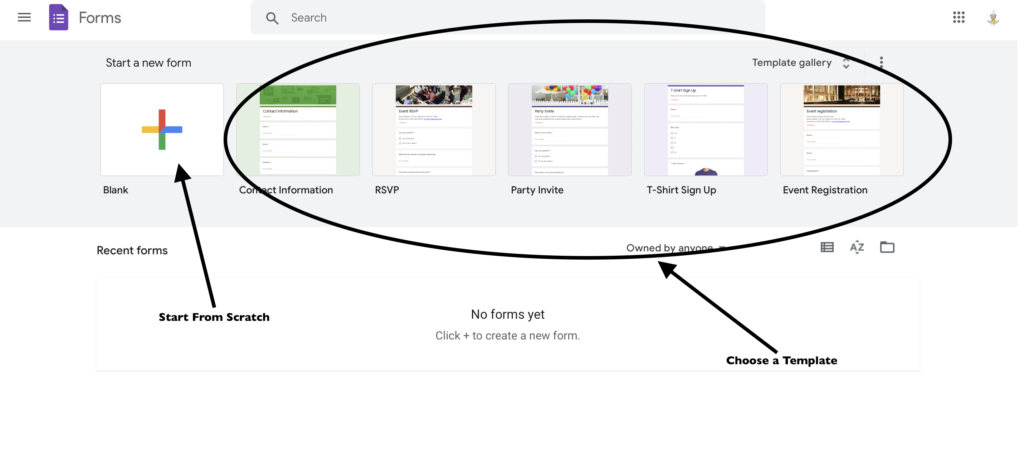
First, open Google Forms. Next choose to start with a blank template by clicking on the plus sign (+) in the upper left corner.

You can also choose to use one of Google’s many templates. Templates can be a huge time saver since they are pre-made, and you can just change the questions according to your needs. If you decide to start from scratch, you can select “Blank” and add the title and description of your quiz.

Step 2: Make the Google Form a Quiz
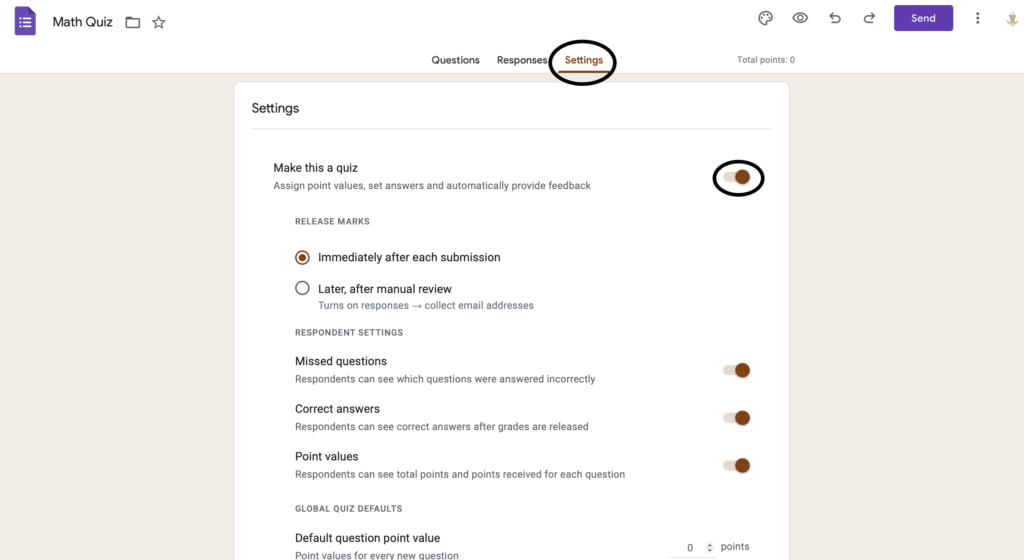
Once you have created your new form or selected your template, it is time to convert your Google form to a quiz in order to assign a grade.

Click on the setting option right above the form. Once on the setting page, turn on the quiz option. Once clicked, adjust the settings as you see fit.

Adjustments can include when students receive their grades, how often they can take the quiz, providing feedback on the incorrect question, and much more!

Step 3: Add Questions and Answers

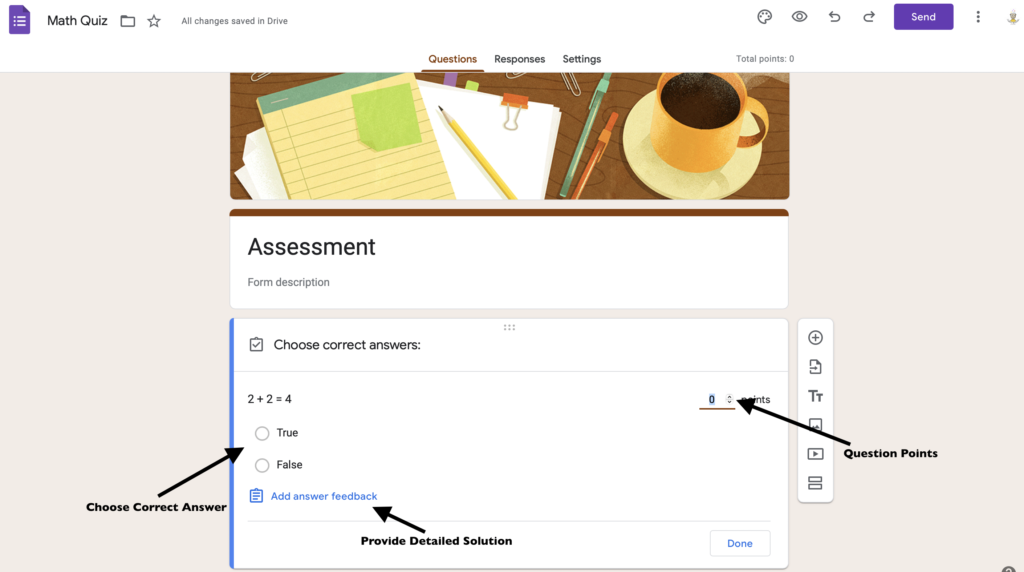
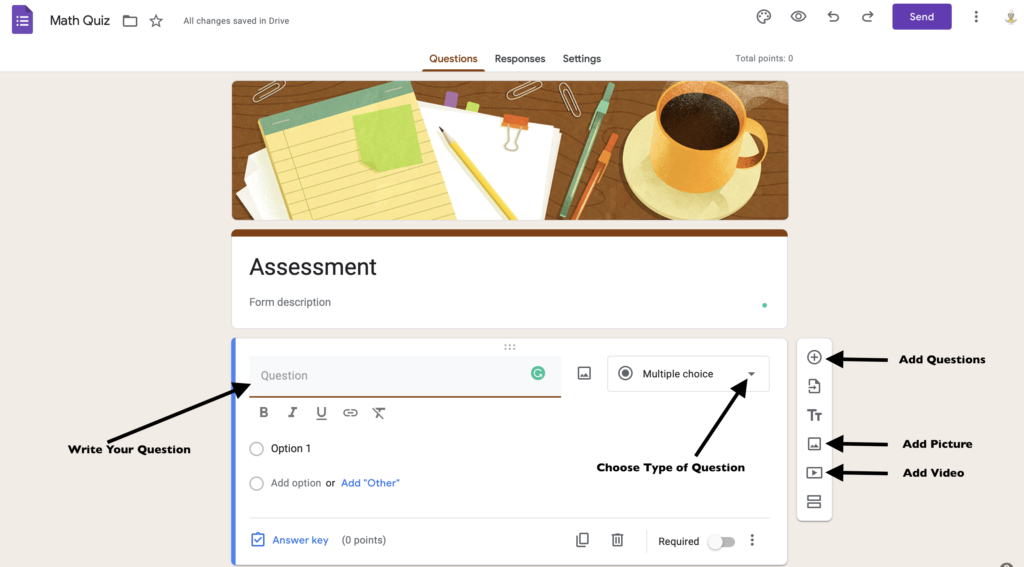
Once you have created your new form or selected your template, it is time to add questions to your assessment. To add a question, click on the plus sign (+) on the right side. You can choose from different question types such as multiple choice, short answer, checkbox, dropdown, and more.

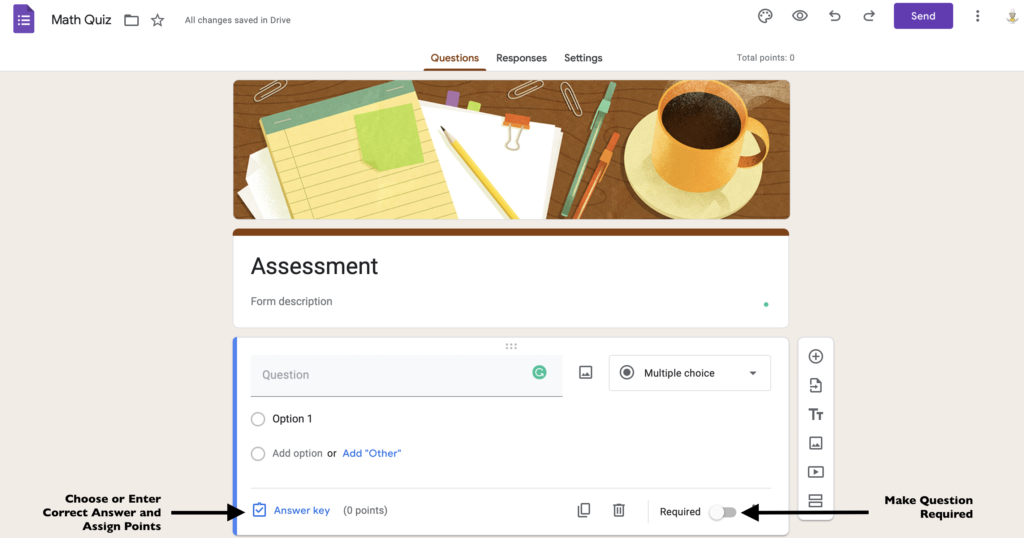
For each question, you can set the required answer, add explanations, and assign point values. You can also add images and videos to make the quiz more interactive and engaging for your students.
Step 4: Customize the Quiz Settings
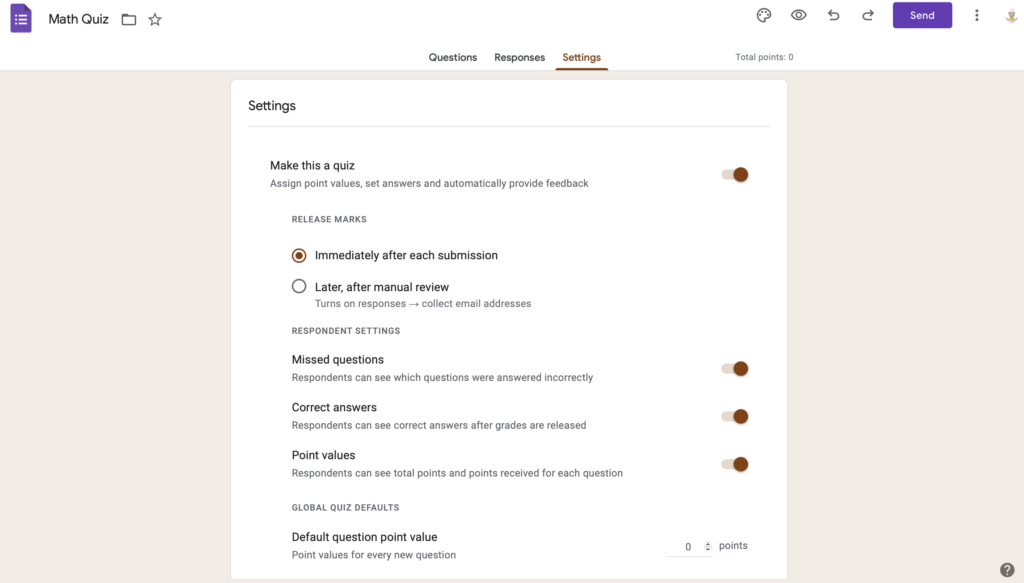
After adding all the questions, you can customize the settings of your quiz. In the “Settings” tab, you can choose to shuffle questions, randomize answers, and set the assessment duration. You can also set the assessment to grade automatically and show students their score and correct answers. Additionally, you can choose whether to collect email addresses or make the quiz anonymous for your students.

Step 5: Share the Quiz with Your Students
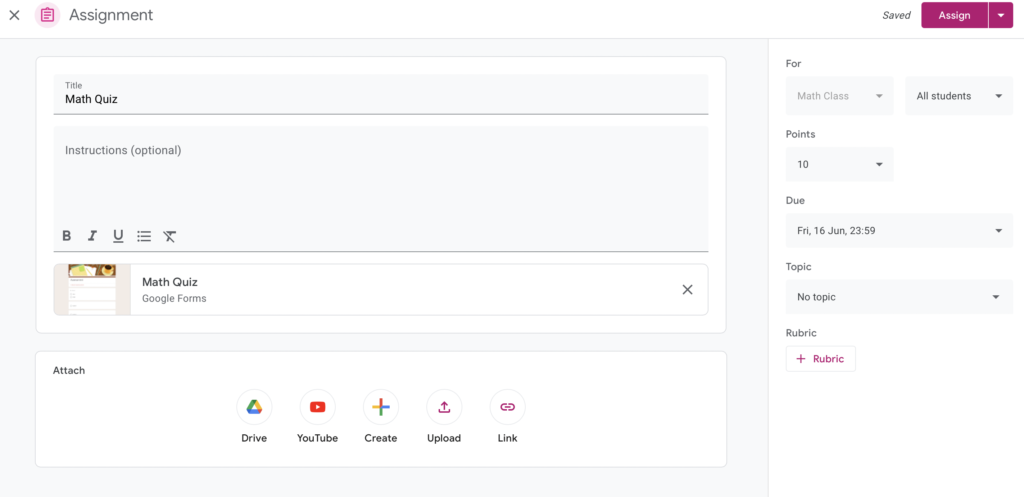
After completing all the necessary settings, it is time to share the assessment with your students. You can share the link to the assessment via email, Google Classroom, or your school’s learning management system.

Students can take the assessment using any device with internet access and submit their answers. Once they have submitted their answers, you can view and grade their responses in the “Responses” tab. You can also download the responses as an Excel spreadsheet for easier tracking.

Step 6: Analyze the Results
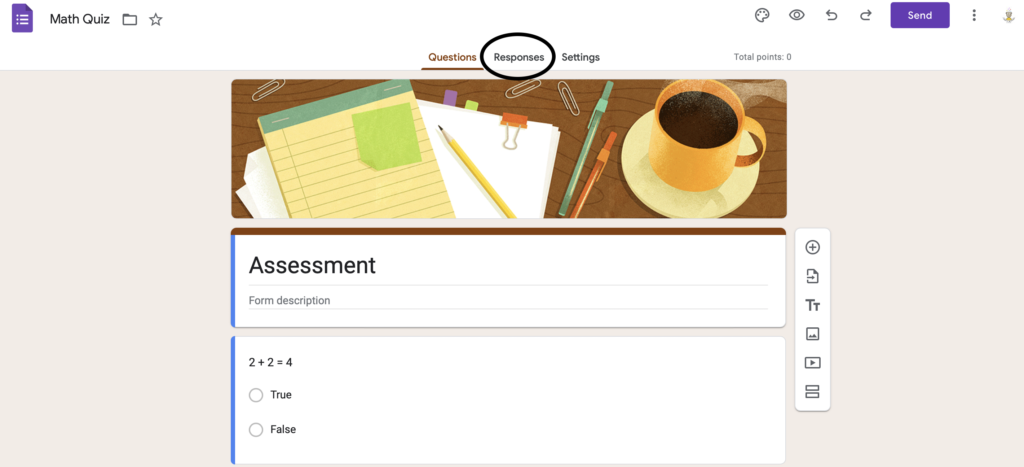
After grading your students’ responses, you can analyze the results using Google Sheets or Forms. Google Forms automatically generates a summary of the results, including the number of responses, average score, and percentage of correct answers.

You can also view the individual responses of each student and read their feedback and comments. This will give you an insight into their understanding of the material and where they may need help.

Conclusion

In conclusion, creating an assessment using Google Forms is an easy and efficient way of assessing your students’ knowledge.

With the step-by-step guide we have provided, you can create a quiz that is customized for your classroom and meets your assessment needs. You can save time and effort by using Google Forms templates and customizing the assessment settings to meet your requirements.

Sharing the assessments with your students is easy and convenient, and analyzing the results will help you understand where your students need help. To learn more about how to share your assessment on Google Classroom read our blog here.

We hope this guide helps you generate assessments that are engaging, informative, and fun for your students.


Popular posts

3 Ways To Improve Problem-Solving Skills With Flipped Learning Today
How to Create Engaging Math Videos For Flipped Learning
5 Reasons Why Flipped Learning is the Future of Education
How to Create an Assessment Using Google Forms

You might also like these articles.

Flipped Learning - How To Spend Less Time Flipping Your Math Class

October 14, 2022Flipped Learning

4 Ways Flipped Learning Teaches Students How To Learn

May 12, 2023Flipped Learning

The Benefits of a Flipped Classroom Model for Building Independent Students

January 16, 2023Flipped Learning

5 Ways to Use Google Classroom in Your Math Class

February 21, 2023Flipped Learning

Flipped Learning - How to Get Students to Watch the Videos

October 7, 2022Flipped Learning

How to Keep Students Organized in a Flipped Classroom

January 6, 2023Flipped Learning

The Importance of Teaching Students How to Learn

November 7, 2022Education

The Importance of Math in Everyday Life

October 24, 2022Mathematics

Flipped Learning - The Classroom Dynamic

October 17, 2022Flipped Learning

5 Reasons to Consider a Math Tutor in High School

February 6, 2023Tutoring

How Flipped Learning Benefits Introverted Students

December 9, 2022Flipped Learning

5 Challenges & How to Overcome Them

September 19, 2022Flipped Learning

Flipped Learning Tips and Tricks for Teachers

April 4, 2023Flipped Learning

Flipped Learning - How to Successfully Flip Your Math Class

September 30, 2022Flipped Learning

The Role of the Teacher in a Flipped Classroom

November 22, 2022Flipped Learning

How to Find the Area of a Parallelogram

October 31, 2022Mathematics

Flipped Learning - Traditional Versus Flipped Classroom: What is the Difference?

September 27, 2022Flipped Learning

How Teachers Can Use a Random Team Generator in a Flipped Classroom

May 3, 2023Flipped Learning

How to Find the Area of a Triangle

November 4, 2022Mathematics

How to Assign an Assignment on Google Classroom

March 9, 2023Flipped Learning

5 Free Online Formative Assessments to Use in Your Classroom

April 19, 2023Flipped Learning

5 Reasons Why Flipped Learning is the Future of Education

July 19, 2023Flipped Learning

Flipped Learning - Why More Math Teachers Are Choosing to Flip Their Class

October 21, 2022Flipped Learning

Flip Your Classroom With These Online Tools

December 20, 2022Flipped Learning

Knowing How to Find The Area Can Help You In The Real World

October 28, 2022Mathematics

Flipped Learning - How to Incorporate Flipped Learning in Any Class

October 3, 2022Flipped Learning

3 Ways To Improve Problem-Solving Skills With Flipped Learning Today

November 29, 2023Flipped Learning

Flipped Learning - What Does A Flipped Classroom Look Like?

September 24, 2022Flipped Learning

Flipped Learning For All Learners: Visual, Auditory, and Kinaesthetic

November 12, 2022Flipped Learning

How to Calculate the Area of a Trapezoid

November 30, 2022Mathematics

Flipped Learning - 5 Reasons to Flip Your Math Class Today

September 19, 2022Flipped Learning

How to Create Engaging Math Videos For Flipped Learning

October 25, 2023Flipped Learning

Flipped Learning - How Flipped Learning Promotes a Growth Mindset

October 10, 2022Flipped Learning

Comparing the Benefits and Drawbacks of Popular Video Platforms for Teachers

January 23, 2023Flipped Learning

How Technology is Transforming Education

November 15, 2022Education

About us

At Simple Modern Learning, we believe that all students can achieve academic success with the right tools and strategies.

  • hello@simplemodernlearning.com
Quick Links
  • Home
  • Math Lessons
  • Math Tutoring Sessions
  • Math Products
  • Full Course Access
  • Blog
  • My Account
Company
  • About us
  • Faq
  • Tutoring Jobs
  • Contact Us
Join our Mailing List

By entering your email, you're consenting to receive marketing communications about Simple Modern Learning. Learn how we use your information in our Privacy Policy.

Join our Mailing List

By entering your email, you're consenting to receive marketing communications about Simple Modern Learning. Learn how we use your information in our Privacy Policy.

Quick Links

  • Home
  • Math Lessons
  • Math Tutoring Sessions
  • Math Products
  • Full Course Access
  • Blog
  • My Account

Contact us

  • hello@simplemodernlearning.com

About us

At Simple Modern Learning, we believe that all students can achieve academic success with the right tools and strategies.

Company

  • About us
  • Faq
  • Tutoring Jobs
  • Contact Us

© 2026 Simple Modern Learning All rights reserved. | At Simple Modern Learning, we believe that all students can achieve academic success with the right tools and strategies. We are dedicated to providing high-quality, innovative educational resources for both teachers and students. That's why we provide helpful educational blogs for teachers and parents while also providing resources for students. Our mission is to make learning simple, modern, and meaningful.


  • Terms & conditions
  • Privacy Policy
  • Refund and Returns Policy
  • Sitemap